Complete Guide to BOM Software for Small Businesses
Everything you need to know about Bill of Materials (BOM) software. Learn how to manage your manufacturing BOM effectively with the right tools.
A Bill of Materials (BOM) is the backbone of any manufacturing operation. It lists every component, raw material, and sub-assembly needed to create your finished product. But managing BOMs in spreadsheets becomes a nightmare as you scale.
This guide covers everything about BOM software for small businesses and how to choose the right manufacturing inventory tracker.
What is a BOM?
A Bill of Materials includes:
- Raw Materials: Steel, fabric, chemicals, etc.
- Components: Screws, buttons, circuits, etc.
- Sub-Assemblies: Pre-built parts used in final assembly
- Quantities: How much of each item is needed
- Unit Costs: For COGS calculations
Why You Need BOM Software
1. Accurate Costing
Know your true Cost of Goods Sold by linking BOM items to expenses. Learn how to track COGS.
2. Inventory Planning
Calculate raw material needs based on production orders. Apply MRP principles for smarter planning.
3. Consistency
Ensure every batch uses the same components in the same quantities.
Features to Look for in BOM Software
When evaluating bill of materials software for small businesses, look for:
- Easy Import: Bulk upload via CSV
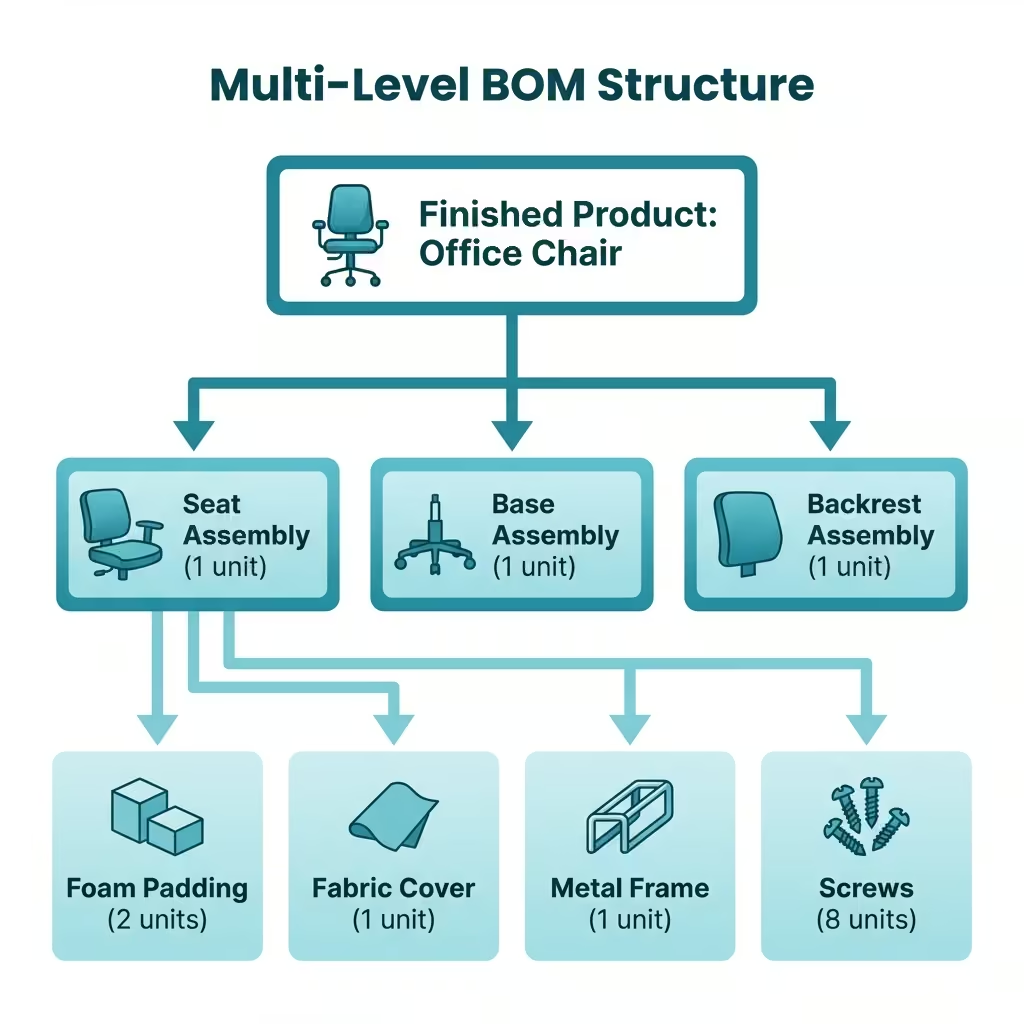
- Multi-Level BOM: Support for sub-assemblies
- Cost Rollup: Automatic COGS calculation
- Integration: Works with your inventory and expense tracking
- Change Tracking: See who modified BOMs and when
How Rekavoze Handles BOMs
Rekavoze offers:
- Multi-Level BOM Support: Build complex assemblies with nested components
- Unified Tracking: Link BOM items to inventory and expenses
- Automatic Cost Rollup: Recursive COGS calculation for nested assemblies
- Change Audit Log: Track who modified BOMs and when for accountability
Getting Started
- Export your current BOM from Excel
- Sign up for Rekavoze (free tier available)
- Use the Bulk Import tool to upload
- Start tracking production costs in real-time
Next Steps
- Set up low stock alerts for BOM components
- Learn raw material tracking best practices